Ross-Tech Car Scanner About
Ross-Tech Car Scanner :-
ROSS TECH :
VCDS
Windows-basedDiagnostic Software
for VW / Audi / Seat / Skoda
What is VCDS-Mobile?
VCDS-Mobile is diagnostic software for VW-Audi Group cars running in the HEX-NET interface. VCDS Mobile includes a web server in the interface and can be used with any device that has WiFi and a modern web browser. VCDS-Mobile is not an "app" that runs on your mobile device.
What do I need to use VCDS-Mobile?
You will need a HEX-NET Interface.
You will need some sort of computing device that can communicate via WiFi and has a reasonably modern web browser. This can be a smart phone (iPhone, Android, Blackberry 10, Windows Phone, etc); it can be a tablet (iPad, Android, Windows RT tablet, etc); or it can be a laptop or desktop computer running Linux, MacOS, or even Windows. ;-)
Is VCDS-Mobile easy to use?
Well, that depends. Unlike VCDS running on a Windows PC with a wired interface, using VCDS-Mobile requires some rudimentary knowledge of networking to get the HEX-NET interface communicating with whatever device youre using as well a finding it a away to access the the internet so it can communicate with the VCDS-Cloud server. However if you get past that hurdle and youve used VCDS, youll find VCDS-Mobile to have a familiar look and and feel, and it should be just about as easy to use as VCDS is.
What can VCDS-Mobile do?
Well, that depends. VCDS-Mobile has two modes of operation, Stand-Alone and Cloud-Connected. In Stand-Alone mode, VCDS-Mobile can do Auto-Scans, read and clear fault codes, look at measuring values, and log data. If it can communicate with the VCDS-Cloud server (and its associated with an account on the server), it gains additional functionality and is able to do Adaptations, Basic Settings, Coding, Login/Security-Access, and so on. Please understand that at the time of this writing VCDS-Mobile is a Beta product and we may have overlooked something.
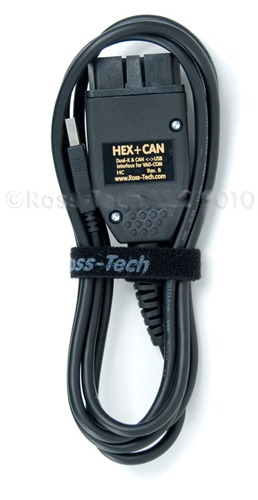
Comprehensive VAG-COM Protocol SupportDesigned for Volkswagen, Audi, Seat, Skoda, and other VAG vehicles, the Ross-Tech VCDS Cable offers full compatibility with VAG-COM diagnostic protocols. This means users can access a broad range of fault codes and real-time data, ensuring in-depth analysis for efficient troubleshooting and repair.
User-Friendly Operation and Compact DesignWith a manual button interface and clear LED indicators, this car scanner makes vehicle diagnostics straightforward. The lightweight and portable design allows for ease of use in various environments, while its sturdy ABS construction ensures durability during repeated automotive tasks.
Safe and Reliable PerformanceThe scanner includes built-in safety measures such as short-circuit and overload protection, safeguarding both the device and connected vehicles. It operates within a wide temperature range, accommodates USB or vehicle battery power, and receives regular software and firmware updates for ongoing reliability.
FAQs of Ross-Tech Car Scanner:
Q: How do I set up the Ross-Tech VCDS Cable for diagnostics?
A: To set up the VCDS Cable, connect the device to your vehicles OBD-II port and link it to your Windows PC via USB. Install the VCDS software (compatible with Windows OS), then follow on-screen prompts. Once the LED indicator shows connection, you can start the diagnostic scan.
Q: What types of vehicles are supported by this scanner?
A: This scanner is specifically designed for Volkswagen, Audi, Seat, Skoda, and other vehicles within the VAG group. It supports all models using VAG-COM protocols and offers wide compatibility for fault diagnosis and maintenance.
Q: When should I use the Ross-Tech Car Scanner?
A: You should use the scanner whenever you detect a warning light, experience unusual vehicle performance, or are performing routine maintenance. It provides quick fault detection, helping you diagnose issues before they escalate.
Q: Where can I obtain software updates for the device?
A: Software and firmware updates for the VCDS Cable are periodically released by Ross-Tech and can be downloaded via the official website. Installing updates enhances compatibility, functionality, and diagnostic performance.
Q: What benefits does the LED indicator provide during use?
A: The LED indicator offers quick visual feedback of the devices operational status, including power connection, data transmission, and error alerts, enabling intuitive and efficient diagnostics.
Q: How does the scanner ensure safety during vehicle diagnostics?
A: The device is equipped with short-circuit and overload protection, ensuring safety for users, vehicles, and the scanner itself throughout the diagnostic process.
Q: What is the process for detecting vehicle faults with this scanner?
A: After installing the VCDS software and connecting the scanner to your vehicle and computer, select the desired diagnostic mode. The system will read and display error codes or real-time data, allowing you to assess, diagnose, and clear faults as needed.

 Send Inquiry



 Send Inquiry

 Send Inquiry


